





Filing crypto tax in Canada does not have to mean hours of spreadsheets. cryptact calculates your gains and losses using the CRA’s required average-cost method, then produces the exact figures TurboTax Canada needs, so you can go from transaction history to a filed return without the guesswork.
This guide is written for individuals filing their own personal tax return. For most individual investors, the CRA treats crypto disposals as capital property, and TurboTax Canada reports them through the standard Capital Gains section. If your activity is business-like, such as high-frequency trading or commercial mining, your profits may count as business income instead, which falls outside the scope of this guide.
Below, we walk through the process step by step, from preparing your figures in cryptact to entering them in TurboTax.
Key takeaways
- TurboTax Canada reports crypto through the standard Capital Gains section, but it does not calculate your proceeds or ACB for you.
- Crypto filing needs the Do It Yourself Premier plan or higher. The Free and Deluxe tiers do not include the capital gains workflow.
- The CRA requires the average-cost method for ACB. FIFO, LIFO, and specific identification are not permitted.
- Capital gains (50% inclusion) and crypto income such as staking or mining (100% inclusion) are entered in completely different TurboTax sections.
- cryptact’s Summary Report gives you the exact figures TurboTax asks for: total proceeds, total ACB, and outlays and expenses.
Table of contents |
No credit card required
Before You Start: Choosing the Right TurboTax Plan
TurboTax lets you start filing for free and only asks you to choose a plan when you are ready to file. That said, it’s worth knowing upfront: crypto tax reporting requires the Do It Yourself Premier plan or higher. The Free and Deluxe tiers do not include the capital gains workflow needed for crypto.

Step 1: Prepare Your Numbers in cryptact
TurboTax lets you file your crypto tax alongside your other income, but it doesn’t calculate the numbers for you. That’s where a crypto tax tool comes in. Here’s how to get them ready with cryptact.
At minimum, you’ll need on TurboTax:
- Total proceeds of disposition in CAD — covering every sale, trade, or spend of crypto for the year
- Total adjusted cost base (ACB) — calculated using Canada’s mandatory average-cost method, not FIFO or specific identification
- Outlays and expenses — trading fees and other deductible costs
- A disposition date — you can aggregate a full year’s activity to a single date (December 31 works)
Why average-cost matters: Every time you buy more of an asset, your per-unit ACB is recalculated across your entire holding. Crypto-to-crypto trades each trigger their own disposition too, since the CRA values the crypto received in CAD at the time of the trade. For anyone with more than a handful of transactions, this quickly becomes difficult to track on your own.
Now, cryptact calculates your capital gains, losses, income, and expenses automatically. Make sure all transactions are added, and any error messages are resolved before proceeding.
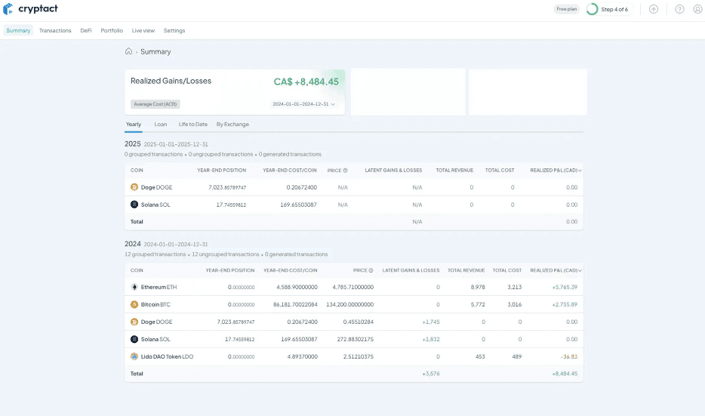
Once it is done, download your Summary Report from the Transaction page — this contains all the figures you will need for TurboTax.
Step 2: Enter Your Crypto Capital Gains in TurboTax
Once you have your numbers from cryptact, the TurboTax steps are straightforward.
1. Search for the capital gains section
In TurboTax’s search bar, type “capital gains and capital gains deduction” and select it.
2. Check the capital property box
On the Capital Gains Profile page, check out “Sold stocks, crypto, bonds, real estate, other capital property.”

3. Select the crypto property type
From the dropdown, select “Cryptoassets: cryptocurrency.”
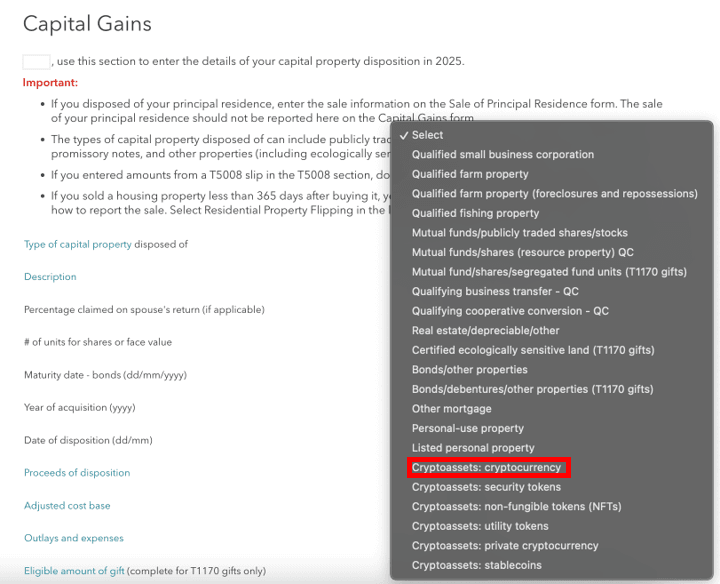
4. Enter your figures from cryptact
Fill in your total proceeds of disposition, adjusted cost base, outlays and expenses, and disposition date. For the date of disposition, use December 31 if you are aggregating your full year of transactions into a single entry. This field is mandatory in TurboTax.
Your cryptact Summary Report gives you exactly what TurboTax needs:
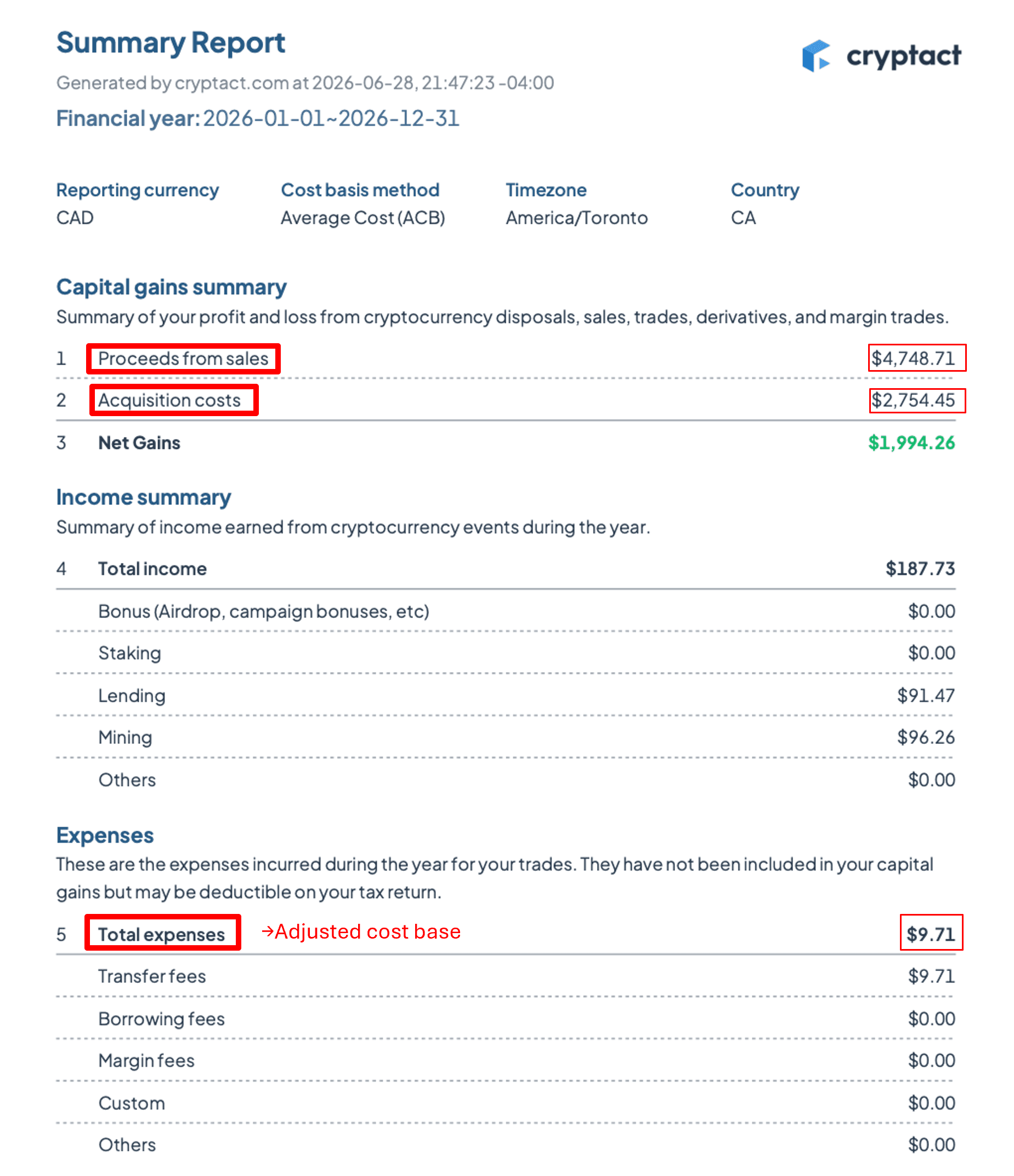
Once you’ve entered your figures, select Done and TurboTax will automatically carry your capital gain or loss through to Schedule 3.
Capital Gains vs. Crypto Income: Not the Same Thing
TurboTax handles these in completely different sections and mixing them up is one of the most common crypto filing errors.
| Type | Example | Taxable Inclusion | Where in TurboTax |
| Capital gain | Selling or trading BTC at a profit | 50% | Capital Gains section (Schedule 3) |
| Crypto income | Staking rewards, mining proceeds | 100% | Income section |
Capital gains flow through Schedule 3 as described above. Only 50% of the gain is included in your taxable income.
Crypto income — staking rewards, mining, or being paid in crypto — is taxed at 100% of its fair market value when received and gets reported in TurboTax’s income section instead.
One thing to watch: a single asset can trigger both. If you stake in ETH and receive a reward, the fair market value of that reward is income on the day you receive it. If you later sell that ETH, any change in value between receipt and sale is a separate capital gain — with the income amount you already reported becoming your new ACB. cryptact tracks both automatically and keeps them separated in your report.
A Few Checks Before You File
Before you hit submit, it’s worth a quick review:
- Cross-check total proceeds against your exchange statements — if the figure doesn’t match what you traded or withdrew, something may have been missed
- Verify your ACB is within range — with average-cost, your per-unit ACB should sit somewhere between your highest and lowest purchase price for that asset
- Watch for the superficial loss rule — if you sold crypto at a loss and bought back the same asset within 30 days before or after the sale, the CRA will typically deny the loss
- Check T1135 if applicable — if the total cost of crypto held on foreign exchanges exceeded CAD $100,000 at any point in the year (combined with other foreign property), you may need to file Form T1135 separately
How cryptact Simplifies TurboTax Filing
cryptact is built specifically to produce the figures TurboTax Canada’s capital gains section is asking for — calculated the way the CRA requires, not the way U.S. software defaults to.
Here is what that looks like in practice:
- Average-cost method applied automatically across every exchange, wallet, and DeFi position you connect
- Automatic transaction classification for trades, staking rewards, and NFT activity — so things that are easy to miscategorize by hand get handled consistently
- Guided error resolution that flags incomplete cost-basis history, unclassified transfers, or data gaps before they distort your totals
- Clean output — total proceeds, total ACB, and total income figures in the exact format TurboTax asks for
You can import your transaction history and review the calculations for free before deciding whether you need a downloadable report.
TurboTax Canada will get your taxes right once it has accurate numbers. The challenge is getting those numbers right in the first place — and that is the gap cryptact is built to close.
Frequently Asked Questions
Can TurboTax Canada calculate crypto tax?
TurboTax calculates the tax owing once you have entered your proceeds and ACB, but it does not calculate those figures for you. You need to determine your adjusted cost base using the CRA’s mandatory average-cost method before entering anything into TurboTax.
What information do I need before using TurboTax for crypto?
At minimum: total proceeds of disposition in CAD, total adjusted cost base in CAD, any deductible expenses, and a disposition date. If you earn crypto income from staking or mining, you will also need the fair market value of that income separately — it is reported differently from capital gains.
How is ACB calculated for crypto in Canada?
Canada requires the average-cost method: divide the total cost of all units held by the total number of units to get a per-unit average. This updates every time you acquire more of that asset. FIFO, LIFO, and specific identification are not permitted under CRA rules.
Can I aggregate crypto transactions into one entry in TurboTax?
Yes. You can use a single aggregated disposition date — commonly December 31 — when entering a full year activity as one combined proceeds and ACB figure. The date field is mandatory, so it must be filled in even when aggregating.
Does TurboTax support cryptocurrency in Canada?
Yes — “Crypto assets: cryptocurrency” is a selectable property type within TurboTax’s standard capital gains section, and it applies to the 50% inclusion rate automatically. It does not import or reconcile exchange data, though, so most filers with multiple transactions use separate crypto tax software to prepare their figures first.