MCP (Model Context Protocol) is a “common set of rules” for connecting AI with external tools. Since the AI company Anthropic introduced it in November 2024, it has spread rapidly. As of May 2026, monthly SDK downloads exceed 97 million, and it is becoming established as a standard across the AI industry.
When a service supports MCP, connecting to it from AI makes it more convenient to work with than before. This is gaining traction even in the cryptocurrency industry, where profit-and-loss calculations and portfolio management tend to get complex.
This article explains MCP, from its meaning and mechanics to use cases in business and daily life and how to use it safely, in a way that requires no specialist knowledge.
What you’ll learn from this article
- The meaning and overview of MCP (Model Context Protocol), explained simply.
- How MCP connects AI with external tools.
- How MCP can be used in business, in daily life, and in specialized fields.
- The security principles for using MCP safely.
- A first step for trying MCP, with example services for reference.
No credit card required
What is MCP? Understand its meaning and background in three minutes
MCP’s full name and the background of its creation
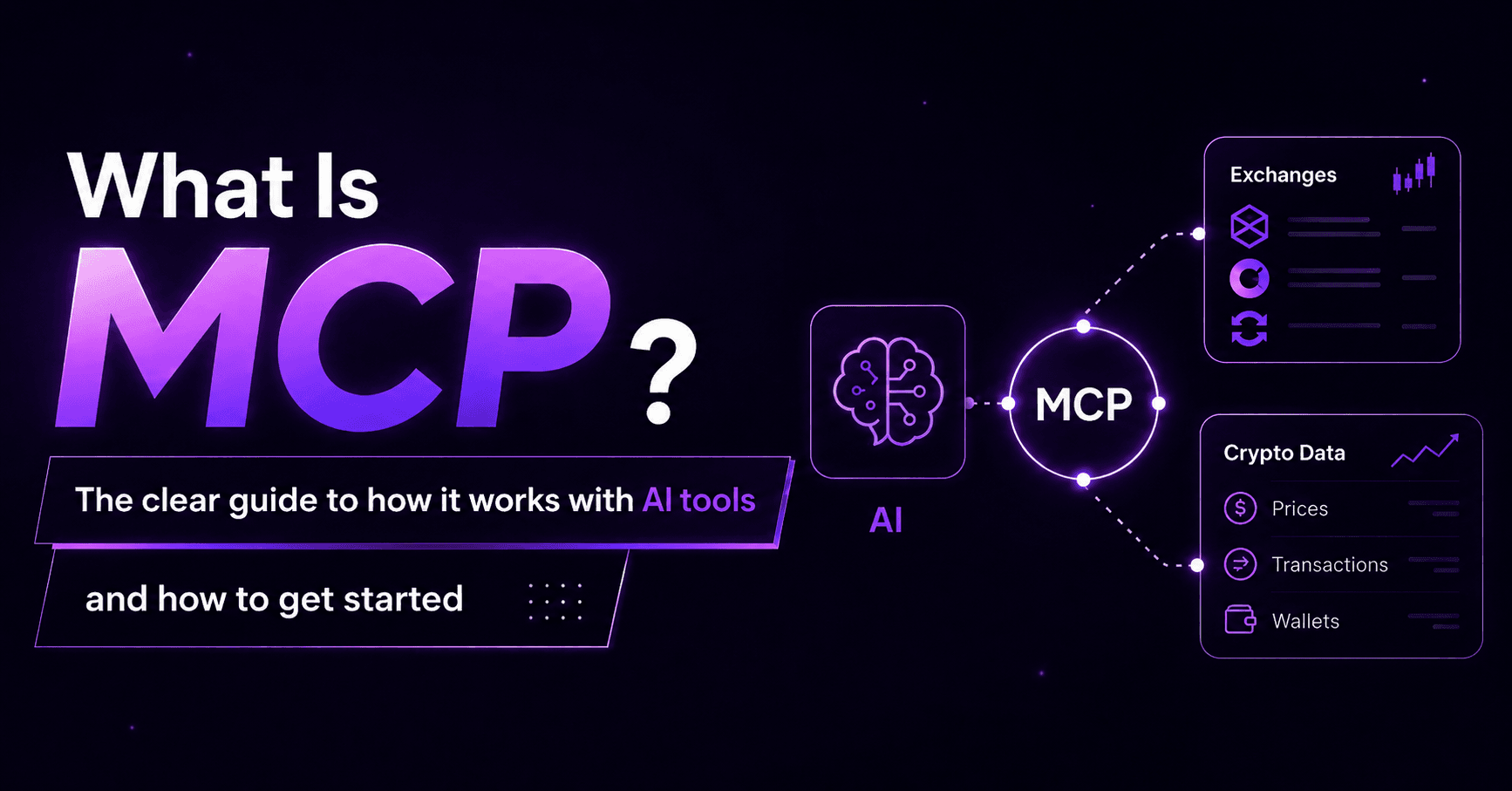
MCP stands for “Model Context Protocol.” It is an open protocol (a common communication standard) for connecting AI models with external tools and data sources in a safe, standardized way, and it was introduced by the AI company Anthropic in November 2024.
A “protocol” is a set of rules that computers follow to communicate with one another. Just as the internet has protocols such as HTTP and HTTPS, MCP provides a common set of rules for connecting AI with external tools. With tools that support these rules, an environment is taking shape in which any AI can connect to them in the same way.
The MCP specification is published as open source, so anyone is free to implement and use it. On December 9, 2025, the Linux Foundation announced the establishment of the Agentic AI Foundation (AAIF), and Anthropic donated MCP to the AAIF. This positioned MCP not as a single company’s specification but as a neutral, industry-wide standard. Today, in addition to Anthropic, major AI companies including OpenAI, Google, Microsoft, AWS, Cloudflare, and Bloomberg participate in the AAIF.
A simple analogy: MCP is a common language, like “USB-C for AI”
The most concise way to describe MCP is “a USB-C port for AI.”
Smartphones used to have different charging connectors depending on the manufacturer and model. Both Android and iOS devices required their own cables depending on the model, and forgetting a cable while traveling meant you couldn’t charge. With the arrival of the unified USB-C standard, many devices could be charged and exchange data using the same cable.
MCP works on the same idea. Until now, connecting AI with an external tool required developing a separate connection process for each tool. With a unified standard like MCP, the environment becomes one where “any MCP-compatible tool can be used from AI in the same way.” Once both the AI side and the tool side implement MCP support a single time, the possible combinations expand freely.
The “AI integration cost” problem that MCP solves
Before MCP appeared, connecting AI with external tools required implementing a separate API integration for each tool. In software development this is known as the “M×N problem.” If there are 10 types of AI (M) and 10 types of tools (N), you may need up to 100 separate connection processes to link them all.
MCP solves this by building a common bridge between AI and tools. An AI only needs to support one set of rules, MCP, in order to connect with all MCP-compatible tools. The same applies on the tool side: once a tool supports MCP, it can be used by all compatible AI.
This efficiency matters not only to developers but also to everyday users of these tools. As the combinations with AI expand, so does the potential to automate and streamline a wider range of work and tasks with AI.
How MCP works: the three-layer structure of host, client, and server
A key to understanding how MCP works is the three-layer structure of host, client, and server. It sounds complicated, but each role is simple.
What is an MCP host? The AI application itself
An MCP host is the AI application that the user operates directly. Claude Desktop, ChatGPT, and Gemini are representative examples. The host contains a component called an “MCP client,” and it communicates with MCP servers through this client.
To use a restaurant analogy, the host is the “whole restaurant,” and the “waiter” who actually relays orders to the kitchen is the client. The user speaks to the host (the restaurant), while behind the scenes the client (the waiter) coordinates with each MCP server (the kitchen).
What is an MCP client? The “communication handler” inside the host
An MCP client is a component built into the host application that handles the actual communication with an MCP server. One client maintains a one-to-one connection with one MCP server, sending tool calls and resource-retrieval requests to the server.
It is invisible to the user, but as the practical handler that connects the host with MCP servers, it forms the core of the MCP architecture.
What is an MCP server? A “lightweight program” that provides external functions
An MCP server is a lightweight program that provides the functions of a specific data source or external tool to a client. It handles access to file systems, databases, and external APIs in response to requests from the client, returning the needed information or functions.
When various services publish MCP servers, AI assistants such as Claude Desktop and ChatGPT can safely access those services’ data and functions. As of May 2026, there are more than 10,000 active MCP servers, and services across many fields are continuing to add support.
| Examples of supported services by category (as of May 2026) | |
| Category | Representative service examples |
| File management | Google Drive, Notion, Dropbox |
| Calendar and scheduling | Google Calendar, Microsoft Outlook |
| Communication | Slack, GitHub |
| Development tools | GitLab, Linear |
| Accounting and finance | QuickBooks, Xero |
| Cryptocurrency | cryptact |
The three basic elements: tools, resources, and prompts
MCP has three basic elements called “primitives.” When an MCP server provides these three, AI becomes able to interact with external tools.
| Element | What the server provides | Concrete example |
| Tool | “Actions and functions” the client can call | Adding an event to a calendar, sending an email |
| Resource | “Information and data” the client can retrieve | Files on a drive, data in a spreadsheet |
| Prompt | “Template-style instructions” that guide the AI’s thinking | A template for a request such as “find my free time this week” |
For example, if you ask an AI to “schedule a one-hour meeting for next Monday afternoon,” the three elements work as follows:
- Resource: retrieves calendar data and checks for free time
- Tool: carries out the action of adding the event to the calendar
- Prompt: defines the conditions of “next Monday, afternoon, one hour, meeting”
Through these three mechanisms, the potential expands for AI to receive instructions in natural human language and actually operate external tools.
What can you do with MCP? Use cases in business and daily life
As MCP becomes widespread, AI can take on practical roles in a variety of work and everyday situations, going beyond simply answering questions. When using Claude Desktop, simply setting up a connection to an MCP server may let you carry out operations like the following through instructions in natural language.
Streamlining schedule, email, and document management
The most familiar use case is streamlining schedules, email, and file management. Tasks that previously required moving back and forth between several apps may now be handled together within a conversation with AI.
Examples include:
- “Schedule a one-hour meeting in my free time this week” → automatically adds the event to Google Calendar
- “Write a polite reply to Mr. A and send it via Gmail” → generates the email text and sends it
- “Find the latest version of the proposal I made last month in Google Drive” → searches by file name or content and displays the relevant file
These operations may be carried out together within a conversation with AI, without switching between multiple apps, provided each service (such as Google Workspace or Slack) offers an MCP server.
Automating data analysis and report creation
Checking figures and creating documents can also be made more efficient in combination with MCP. By connecting to a spreadsheet or database via MCP, AI may be able to read the data directly and handle aggregation, analysis, and write-up all at once.
Examples include:
- “Aggregate last month’s sales data in the spreadsheet and summarize the month-over-month change” → reads the data and displays the totals and the month-over-month comparison in a list
- “Draft a weekly report in Google Docs” → handles everything from retrieving the data to creating the document
- “Check whether last week’s meeting minutes are in Notion” → searches the workspace contents and displays the results
Part of the work in which a staff member opens Excel or Notion to check data and create documents may be delegated to AI.
Streamlining customer support and internal inquiry handling
An AI agent using MCP can also contribute to faster, higher-quality inquiry handling by integrating with CRM and help desk tools.
Possible situations include:
- “Check customer A’s past inquiry history and draft a response for this case” → retrieves the history from the CRM and generates a reply
- “See if there’s a similar question in our internal FAQ, and if so, tell me the answer” → searches across internal documents and extracts the relevant information
- “Summarize what was discussed in #general on Slack last week” → retrieves past messages and summarizes the key points
Operations that span multiple tools can also be carried out together within a single conversation when MCP is in place.
How is MCP different from an API? Sorting out commonly confused concepts
When you look into MCP, a common question is “How is it different from an API (Application Programming Interface)?” The two are often confused, but they operate on different levels.
Sorting out the difference in roles between API and MCP
An API is an “individual point of access” that a specific service exposes to the outside world. The Google Calendar API, for example, provides an entry point for retrieving and adding events in Google Calendar. However, because each service’s API has different specifications, an AI trying to use both the Google Calendar API and the Slack API needs a separate implementation tailored to each.
MCP is a “bridging standard” for handling those multiple APIs in a unified way. By placing a common protocol between AI and tools, it lets any MCP-compatible service be used from AI in the same way.
| Comparison item | API | MCP |
| Role | An individual point of access for working with a specific service | A bridging standard for handling multiple APIs in a unified way |
| Specification | Differs by service | A unified, common specification |
| Integration with AI | Requires a separate implementation per service | Connects in the same way if MCP-compatible |
| Example | Google Calendar API, Slack API | MCP-compatible Google Calendar, MCP-compatible Slack |
It helps to understand MCP not as something that “replaces” APIs, but as a “higher-layer standard” that makes APIs easier to handle under a unified set of rules.
What is the difference between MCP and A2A? Explaining their complementary relationship
Alongside MCP, an open protocol that Google calls A2A (Agent-to-Agent Protocol) has been drawing attention. The names are similar, so they are easy to confuse, but the roles they play differ.
- MCP (Model Context Protocol): a standard for AI agents to access external tools and data sources. Specialized in “connecting AI with tools.”
- A2A (Agent-to-Agent Protocol): a standard for AI agents to exchange information and work together. Specialized in “coordination between AI.”
Google itself explains that “A2A is complementary to Anthropic’s MCP,” so they are not competitors. In the future, the expected pattern is to use MCP to connect AI with tools and A2A to coordinate multiple AI agents.
The benefits of MCP, and what you should know before using it
The main benefits of MCP
Here are the main benefits you can gain from using MCP.
1. You can use multiple tools together from AI
With MCP-compatible tools, you can operate them all from a single AI assistant. Calendars, email, file management, and other apps that you previously opened individually can now be handled by AI across the board.
2. You can use them the same way from any AI tool
MCP is a standard that does not depend on a specific AI tool. Whether you use Claude Desktop or ChatGPT, an MCP-compatible service can be used in the same way. One benefit is that even if you switch the AI you use, your already-connected services remain usable.
3. Security design is standardized
Because the MCP server centrally handles access control, you can clearly set “what can be done with which data.” Read-only settings and safe authorization flows using OAuth authentication are provided as standard, making it easier to ensure safety when handling personal information or business data.
4. You may be able to operate multiple services together using natural language
Even without programming knowledge, you may be able to operate external tools simply by instructing the AI in everyday language. This makes it easier for people who are not technically inclined to benefit from streamlining their work through AI.
Key points for checking the reliability of connected services and managing permissions
When using MCP, it is important to check the following points.
Check the provider of the MCP server you connect to
MCP servers are something third parties can publish. Connecting to a server whose reliability has not been verified carries a risk of unintended access to data. Make a habit of checking in advance whether the MCP server is provided by an official service, along with the connection URL and the provider.
Grant only the minimum necessary permissions
When connecting to an MCP server, the scope of access permissions is presented to you. When handling business or personal data, we recommend limiting the setting to only the permissions you need. Operating with minimal permissions, such as “read-only,” is the basic principle.
Final decisions on tax and legal matters should be made by people
Even if AI organizes and presents data for you, final decisions on tax and legal matters must be made by professionals such as tax accountants or lawyers, or by you yourself. Take particular care when handling data in the financial and tax domains with AI.
Use cases for MCP in cryptocurrency management
So far we have introduced general use cases, but the combination of MCP and AI is also beginning to spread in the management of cryptocurrency holdings.
Checking profit and loss and grasping your portfolio with AI
For crypto investors who hold accounts at multiple exchanges, grasping in real time “which assets you hold and how much” and “how large your unrealized profit or loss is” is a time-consuming task. Using an MCP server that supports cryptocurrency lets you make checks like the following within a conversation with AI:
- “Tell me my current portfolio holdings” → displays a list of positions based on registered transaction data
- “What is my acquisition cost and unrealized profit or loss for Bitcoin (BTC)?” → instantly answers with the average acquisition cost and current valuation profit or loss
- “What was my realized profit or loss for 2025?” → checks the realized profit-and-loss summary by year
pafin Inc., which operates the profit-and-loss calculation tool cryptact, published an MCP server in April 2026. It is one of the first crypto tax tools to support MCP.
What you can do with the cryptact MCP server (read/write support, OAuth authentication)
By connecting to the MCP server of the profit-and-loss calculation tool cryptact from an MCP-compatible AI tool such as Claude Desktop, you can not only check your crypto profit-and-loss and portfolio data within a conversation with AI, but also perform write operations such as uploading transaction data and automatically resolving errors.
Read functions: information you can check (as of May 2026)
- Realized profit-and-loss summaries by year and by asset
- Searching transaction history by date, transaction type, currency pair, and exchange
- Acquisition cost and unrealized profit or loss for held positions (please confirm internally regarding the scope of real-time information such as market prices)
Write functions: operations you can perform with AI (as of June 2026)
- Uploading transaction history files (CSV, sent directly from a conversation with AI)
- Identifying the cause of insufficient-position errors and resolving them automatically
- Setting custom prices for coins with missing price data (bulk resolution)
Key points on safe design
The cryptact MCP server now supports write operations on transaction data in addition to reading data. Beyond checking profit-and-loss data and your portfolio, you can upload transaction history CSVs, resolve insufficient-position errors, and set custom prices for coins with missing price data, all through a conversation with AI. Please always check that the operation details and the reflected results are correct. cryptact cannot accept responsibility for any impact arising from input errors or unintended operations. Note that operations not currently available from MCP (manually adding transaction history, deleting transactions, removing wallet integrations, deleting or updating API keys, changing plans, billing operations, and so on) should continue to be performed directly from the cryptact screen.
If you hold cryptocurrency, we hope you will consider the cryptact MCP server as one option for integrating with AI.
Frequently asked questions
Q1. What is the difference between MCP and an API?
The two operate on different levels. An API is an “individual point of access” for working with a specific service, and the specifications differ by service. MCP is a “bridging standard” for handling multiple APIs in a unified way, a mechanism that lets MCP-compatible tools be used from AI in the same way. It helps to understand MCP not as a replacement for APIs but as a higher-layer standard that makes APIs easier to use.
Q2. Do I need technical knowledge to use MCP?
No. If you are simply using it as an end user, programming knowledge is generally not required. You can use it just by setting up a connection to the MCP server of the service you want to connect to, within an MCP-compatible app such as Claude Desktop. However, engineering knowledge is required if you want to develop and build an MCP server yourself.
Q3. How is MCP different from A2A?
They are two standards with different roles. MCP is a standard for “connecting AI agents with external tools and data sources,” while A2A is a standard for “AI agents coordinating and exchanging information with one another.” Google itself explains that “A2A is complementary to MCP,” so they are not competitors. In the future, the expected pattern is to use MCP to connect AI with tools and A2A to coordinate multiple AI agents.
Q4. Can MCP be used safely? Is there a risk of information leakage?
Yes. Used with appropriate settings, it can provide a certain level of safety. There are points to keep in mind, however. Because MCP servers are something third parties can publish, it is important to check whether the server you connect to is an official, trustworthy one. Also, check the permission scope requested at connection and grant only the minimum necessary permissions. MCP servers provided by official services often have security designs such as OAuth authentication, but always check before use.
Q5. Which AI tools can use MCP?
Yes, multiple AI tools currently support MCP. As of May 2026, Claude Desktop (Anthropic), ChatGPT (OpenAI), Gemini (Google), Microsoft Copilot Studio, Cursor, and VS Code are among those that support it. Any MCP-compatible AI client can connect to and use a common MCP server.
Q6. Can MCP be used for cryptocurrency management?
Yes, it can. As an MCP server specialized for cryptocurrency, the profit-and-loss calculation tool cryptact also publishes an MCP server. By connecting from an MCP-compatible AI such as Claude Desktop, you can check profit-and-loss data and portfolio information in natural language, and you can now also perform write operations such as uploading transaction history CSVs and automatically resolving insufficient-position errors. Be sure to check the reflected content after any write operation. For specific tax decisions, we recommend confirming with a tax accountant or the tax office (for example, the ATO in Australia, the Income Tax Department in India, or the CRA in Canada, etc.) in the end.
Summary
As a “common bridge” connecting AI with external tools, MCP became established as a standard in the AI industry in just a year and a half since it was introduced in November 2024. As of May 2026, monthly SDK downloads exceed 97 million, and it is managed as an industry-neutral standard under the AAIF (Agentic AI Foundation), in which major technology companies such as Google, Microsoft, AWS, and OpenAI participate.
As this article has shown, using MCP opens up the possibility for AI to handle, all together, the tools you use in your daily work, such as schedule management, document creation, and data analysis. An environment in which operations spanning multiple services can be completed within a single conversation with AI is steadily taking shape.
If you hold cryptocurrency, please also check out the MCP server of the profit-and-loss calculation tool cryptact. In addition to checking profit-and-loss and your portfolio, you can now perform write operations such as uploading transaction history CSVs and resolving insufficient-position errors, all within a conversation with AI.
No credit card required